To make note click on ⬇ link
A computer is an electronic machine that takes input, processes it, stores it, and gives meaningful output.
- A computer is an electronic device that processes data.
- It accepts input from users through input devices.
- It processes the data according to instructions.
- It stores data and information for future use.
- It produces useful output in the form of information.
Applications of Computers
Applications of computers are the different fields where computers are used to perform tasks quickly, accurately, and efficiently.
- Education – Used for online learning, research, and preparing assignments.
- Business – Used for accounting, payroll, inventory, and communication.
- Healthcare – Used to maintain patient records and assist in diagnosis.
- Banking – Used for online banking, ATMs, and transaction processing.
- Communication – Used for emails, video calls, and social media.
- Entertainment – Used for watching videos, listening to music, and playing games.
- Science and Engineering – Used for research, simulations, and design work.
- Government Offices – Used for record keeping and public services.
- Transportation – Used for ticket booking, navigation, and traffic management.
- Manufacturing – Used for machine control, automation, and production planning.
Characteristics of a computer
Characteristics of a computer are the special features that make a computer fast, accurate, reliable, and useful for various tasks.
- Speed – A computer can perform millions of calculations in a very short time.
- Accuracy – It produces accurate results if the input and instructions are correct.
- Storage – It can store a large amount of data and information.
- Diligence – It can work continuously without getting tired.
- Versatility – It can perform different types of tasks, such as calculations, gaming, and document preparation.
- Automation – It works automatically once instructions are given.
- Reliability – It can perform the same task repeatedly with consistent results.
- Multitasking – It can handle multiple tasks at the same time.
Functions of a computer
Functions of a computer are the basic tasks a computer performs: Input → Processing → Storage → Output → Control.
- Input – Accepts data and instructions from the user through input devices (keyboard, mouse, scanner, etc.).
- Processing – Processes the input data according to the given instructions.
- Storage – Stores data, programs, and results for future use.
- Output – Produces and displays the processed information to the user.
- Control – Controls and coordinates all operations of the computer system.
Input Devices
Input devices are hardware devices used to enter data and instructions into a computer.
- Input devices send data to the computer.
- They help us use the computer.
- Keyboard is used for typing.
- Mouse is used for clicking and selecting.
- Examples: Keyboard, Mouse, Scanner, Microphone, Webcam.
Central Processing Unit (CPU)
The Central Processing Unit (CPU) is the main part of a computer that processes data and controls all operations of the computer.
CPU is the brain of the computer.
It processes data and instructions.
It controls all computer activities.
It performs calculations and makes decisions.
Without the CPU, the computer cannot work.
Working Cycle of CPU
Fetch → Decode → Execute → Store
- Fetch: Gets the instruction from input devices or memory.
- Decode: Understands what the instruction means.
- Execute: Performs the required task.
- Store: Saves the result in memory or sends it to an output device.
Components of CPU are ALU, Control Unit, Registers, Cache Memory
1. Arithmetic Logic Unit (ALU)
- ALU performs all calculations in the computer.
- It can do mathematical operations like addition, subtraction, multiplication, and division.
- It also performs logical operations such as comparing two values.
- Example: Calculating 10 + 20 = 30.
2. Control Unit (CU)
- CU controls and manages all activities of the computer.
- It receives instructions and tells other parts what to do.
- It coordinates the work of the CPU, memory, input, and output devices.
- Example: It tells the computer when to read data from the keyboard.
3. Registers
- Registers are very small and very fast memory units inside the CPU.
- They temporarily store data and instructions that are being processed.
- They help the CPU work faster.
- Example: Storing a number temporarily during a calculation.
4. Cache Memory
- Cache memory is a small, high-speed memory located close to the CPU.
- It stores frequently used data and instructions.
- This helps the CPU access data more quickly.
- Example: Frequently used program data is kept in cache for faster processing.
Motherboard: A motherboard is the main circuit board of a computer. It connects all the parts of the computer and allows them to communicate with each other. Motherboard is the backbone of a computer that connects and controls all hardware components.
Functions of a Motherboard
1. Connects All Components
- Connects CPU, RAM, storage devices, and other hardware.
- Acts as a communication pathway between components.
2. Provides Power
- Distributes electrical power from the power supply to different computer parts.
3. Enables Communication
- Allows data to move between CPU, RAM, storage devices, and peripherals.
4. Holds Important Components
- Provides slots and sockets for CPU, RAM, graphics card, and expansion cards.
5. Controls System Operations
- Uses BIOS/UEFI firmware to start and manage the computer.
Role of Motherboard in Connecting Components
CPU (Processor)
- The CPU is installed on the motherboard.
- The motherboard helps the CPU communicate with other devices.
RAM (Memory)
- RAM sticks are connected to RAM slots on the motherboard.
- The motherboard transfers data between RAM and CPU.
Storage Devices
- Hard Disk Drives (HDDs) and Solid State Drives (SSDs) connect to the motherboard.
- The motherboard helps store and retrieve data.
Graphics Card
- The graphics card connects through expansion slots.
- The motherboard transfers graphics data between the CPU and monitor.
Input and Output Devices
- Keyboard, mouse, printer, speakers, and monitor connect through motherboard ports.
- The motherboard manages data exchange with these devices.
Importance of Motherboard
- Connects all computer components.
- Enables communication between devices.
- Supplies power to hardware.
- Supports expansion and upgrades.
- Helps the computer function as one complete system.
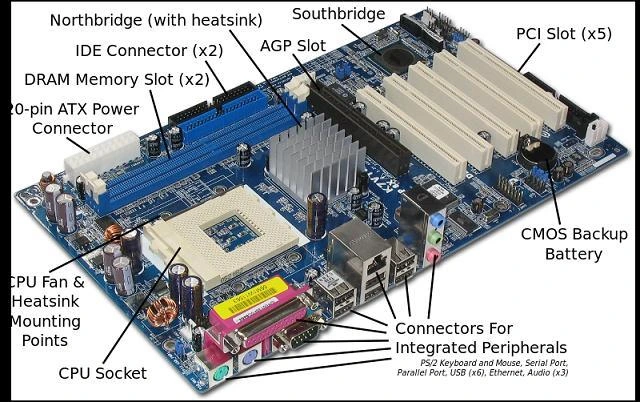
The motherboard is the main circuit board that connects all computer components.
Components on a Motherboard
- CPU Socket
- RAM Slots
- BIOS/UEFI Chip
- Expansion Slots (PCIe)
- Power Connectors
- Storage Connectors (SATA, M.2)
- Chipset
- Data Buses
CPU Socket
The CPU socket is the place on the motherboard where the processor is installed.
It provides electrical connections between the CPU and the motherboard.
RAM Slots
RAM slots are connectors used to install memory modules (RAM).
They allow the computer to store data temporarily while programs are running.
BIOS/UEFI Chip
The BIOS/UEFI chip contains firmware that starts the computer when it is powered on.
It checks hardware components and loads the operating system.
Expansion Slots (PCIe)
PCIe slots allow additional hardware such as graphics cards and network cards to be connected.
They provide high-speed communication between the motherboard and expansion devices.
Power Connectors
Power connectors supply electrical power from the power supply unit to the motherboard.
They ensure that all components receive the power needed to operate.
Storage Connectors (SATA, M.2)
Storage connectors are used to connect storage devices such as HDDs and SSDs.
They enable data transfer between storage devices and the computer system.
Chipset
The chipset manages communication between the CPU, memory, storage, and other devices.
It helps coordinate data flow and controls many motherboard functions.
Data Buses
Data buses are pathways that carry data between different components of a computer.
They enable the CPU, memory, and devices to exchange information efficiently.
Functions
- Connects all hardware devices
- Allows communication between components
- Distributes power
Data Bus and System Bus
A bus is a pathway through which data travels inside a computer.
Types of Buses
a. Data Bus
- Transfers actual data between components.
- Example: CPU ↔ RAM.
b. Address Bus
- Carries memory addresses.
- Tells where data should be read from or written to.
c. Control Bus
- Carries control signals.
- Coordinates operations among devices.
System Bus
The combination of:
- Data Bus
- Address Bus
- Control Bus
is called the System Bus.
Memory is the part of a computer that stores data, instructions, and information so the CPU can use them. Memory is an electronic storage area where data and programs are kept temporarily or permanently.
Why is Memory Important?
Memory helps a computer to:
- Store data and programs.
- Process information quickly.
- Save files for future use.
- Run multiple applications.
- Improve system performance
3. Types of Memory
Memory is mainly divided into two categories:
A. Primary Memory (Main Memory)
This memory is directly accessed by the CPU.
1. RAM (Random Access Memory)
- Temporary memory.
- Stores data while the computer is running.
- Data is lost when power is turned off.
- Faster than secondary memory.
Example: Running applications, opened files.
2. ROM (Read Only Memory)
- Permanent memory.
- Stores startup instructions.
- Data is not lost when power is off.
Example: BIOS/Firmware.
B. Secondary Memory (Auxiliary Memory)
Used for long-term storage.
Examples:
- Hard Disk Drive (HDD)
- Solid State Drive (SSD)
- USB Flash Drive
- Memory Card
- CD/DVD
Features:
- Permanent storage.
- Large capacity.
- Slower than primary memory.
| Primary Memory | Secondary Memory |
|---|---|
| Directly accessed by the CPU. | Not directly accessed by the CPU. |
| Faster in speed. | Slower than primary memory. |
| Stores data temporarily (mostly). | Stores data permanently. |
| Smaller storage capacity. | Larger storage capacity. |
| More expensive per GB. | Less expensive per GB. |
| Used while the computer is running. | Used for long-term storage. |
| Examples: RAM, ROM, Cache. | Examples: HDD, SSD, USB Drive, CD/DVD. |
| Essential for processing data. | Used for saving files and programs. |
Volatile memory loses data when power is turned off, whereas non-volatile memory keeps data even without power.
Volatile Memory
Definition: Memory that loses its data when the power is turned off.
Examples:
- RAM
- Cache Memory
Features:
- Temporary storage
- Fast access speed
- Data is lost when power is off
Non-Volatile Memory
Definition: Memory that retains its data even when the power is turned off.
Examples:
- ROM
- SSD
- HDD
- USB Flash Drive
Features:
- Permanent storage
- Data is retained without power
- Used for long-term storage
Difference Between Volatile and Non-Volatile Memory
| Volatile Memory | Non-Volatile Memory |
|---|---|
| Loses data when power is off. | Retains data when power is off. |
| Temporary storage. | Permanent storage. |
| Faster. | Generally slower. |
| Example: RAM, Cache. | Example: ROM, SSD, HDD. |