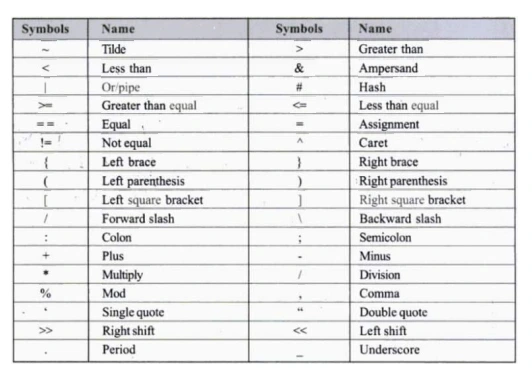
Operators are symbols used to perform operations on variables or values. C provides a rich set of built-in operators to carry out mathematical, relational, logical, and other types of computations on operands.
Types of operators:
1. On the Basis of Number of Operands Required
| Type | Description | Example |
|---|
| Unary Operators | Work with one operand | ++a, --a, |
| Binary Operators | Work with two operands | a + b, a > b, a && b |
| Ternary Operator | Works with three operands | (a>b) ? a : b |
Unary Operators
#include <stdio.h>
int main() {
int a = 5;
printf(“Initial value: a = %d\n”, a);
a++; // increment by 1
printf(“After a++: a = %d\n”, a);
a–; // decrement by 1
printf(“After a–: a = %d\n”, a);
return 0;
}
Ternary program Example
#include <stdio.h>
int main() {
int num;
printf(“Enter a number: “);
scanf(“%d”, &num);
// Using ternary operator to check even or odd
(num % 2 == 0) ? printf(“%d is even.\n”, num)
: printf(“%d is odd.\n”, num);
return 0;
}
2. On the Basis of Utility (Function) of Operators
According to the utility and action, operators are classified into following categories:
1. Arithmetic Operators
2. Relational Operators
3. Logical Operators
4. Assignment Operators
5. Increment and Decrement Operators
6. Conditional Operators
7. Bitwise Operators
8. Special Operators
Arithmetic Operators are the type of operators in C that are used to perform mathematical operations in a C program. They can be used in
programs to define expressions and mathematical formulas
| Operator | Name | Action / Description | Syntax Example |
|---|
+ | Addition | Adds two operands | x + y |
- | Subtraction | Subtracts the second operand from the first | x - y |
* | Multiplication | Multiplies two operands | x * y |
/ | Division | Divides the first operand by the second | x / y |
% | Modulus | Returns remainder of division | x % y
|
#include <stdio.h>
int main()
{
int a = 10, b = 4, res;
// printing a and b
printf(“a is %d and b is %d\n”, a, b);
res = a + b; // addition
printf(“a + b is %d\n”, res);
res = a – b; // subtraction
printf(“a – b is %d\n”, res);
res = a * b; // multiplication
printf(“a * b is %d\n”, res);
res = a / b; // division
printf(“a / b is %d\n”, res);
res = a % b; // modulus
printf(“a %% b is %d\n”, res);
return 0;
}
Output:
a is 10 and b is 4
a + b is 14
a – b is 6
a * b is 40
a / b is 2
a % b is 2
Relaional/ Comparison Operators
A relational operator checks the relationship between two operands. If the relation is true, it returns 1; if the relation is false, it returns value 0.
| Operator | Name | Example | Result / Meaning |
|---|
== | Equal to | x == y | Returns 1 if x is equal to y |
!= | Not equal to | x != y | Returns 1 if x is not equal to y |
> | Greater than | x > y | Returns 1 if x is greater than y |
< | Less than | x < y | Returns 1 if x is less than y |
>= | Greater than or equal to | x >= y | Returns 1 if x is greater than or equal to y |
<= | Less than or equal to | x <= y | Returns 1 if x is less than or equal to y |
#include <stdio.h>
int main()
{
int a = 10, b = 4;
// Greater than example
if (a > b)
printf(“a is greater than b\n”);
else
printf(“a is less than or equal to b\n”);
// Greater than or equal to
if (a >= b)
printf(“a is greater than or equal to b\n”);
else
printf(“a is less than b\n”);
// Less than example
if (a < b)
printf(“a is less than b\n”);
else
printf(“a is greater than or equal to b\n”);
// Less than or equal to
if (a <= b)
printf(“a is less than or equal to b\n”);
else
printf(“a is greater than b\n”);
// Equal to
if (a == b)
printf(“a is equal to b\n”);
else
printf(“a and b are not equal\n”);
// Not equal to
if (a != b)
printf(“a is not equal to b\n”);
else
printf(“a is equal to b\n”);
return 0;
}
Output:
a is greater than b
a is greater than or equal to b
a is greater than or equal to b
a is greater than b
a and b are not equal
a is not equal to b
Logical operators
Logical Operators are used to compare or evaluate logical and relational expressions. The operands of logical operators must be either Boolean
value (1 or 0) or expressions that produces Boolean value. The Output of these operators is always either 1 true or 0 False. The logical Operators
supported in C are:
- && logical AND : it produces true if each operand is true otherwise it produces false.
- || Logical OR : it produces true when any of the conditions is true.
- !Logical NOT- it reverse to the operand.
Write a program to illustrate the output of logical operators.
#include <stdio.h>
int main()
{
int a = 10, b = 5, c = 40;
// Logical AND (&&)
printf(“a < b && a < c is %d\n”, (a < b && a < c));
printf(“a > b && b > c is %d\n”, (a > b && b > c));
// Logical OR (||)
printf(“a < b || a < c is %d\n”, (a < b || a < c));
printf(“a > b || b < c is %d\n”, (a > b || b < c));
printf(“a > c || b > c is %d\n”, (a > c || b > c));
// Logical NOT (!)
printf(“!a is %d\n”, !a);
printf(“!b is %d\n”, !b);
return 0;
}
Assignment Operators
Assignment Operators are also binary operators and they are used to assign result of an expression to a variable. The mostly used assignment operator is ‘=’. There are other shorthand assignment operators supported by C. They are +=,-=,*=,/+ and %=. These Operators are also known as arithmetic assignment operators.
- += Addition Assignment (a+=b, means a=a+b) assign sum of a and b to a.
- -= Subtraction Assignment ( a-=b, means a=a-b) assign subtraction of a and b to a)
- *= Multiplication Assignment (a*=b, means a=a*b) assign multiplication of a and b to a)
- /= Division Assignment (a/=b, means a=a/b) assign division of a and b to a)
- %= Remainder Assignment (a%=b, means a=a%b) assign remainder of a divisible by b to a)
#include <stdio.h>
int main()
{
int a = 10, b = 5;
b += a; // same as b = b + a
printf(“b = %d”, b);
return 0;
}
Increment and decrement operators
The increment operator is used to increase the value of an operand by 1; and the decrement operator is used to decrease the value of an
operand by 1. They take one operand, so called unary operator. The syntax for the operator is:
- ++ variable
- variable++
- –variable
- variable–
#include <stdio.h>
int main() {
int x = 10;
printf(“Initial value of x: %d\n”, x);
x++; // Increment
printf(“After increment (x++): %d\n”, x);
x–; // Decrement
printf(“After decrement (x–): %d\n”, x);
return 0;
}
Output:
Initial value of x: 10
After increment (x++): 11
After decrement (x–): 10
Conditional Operators
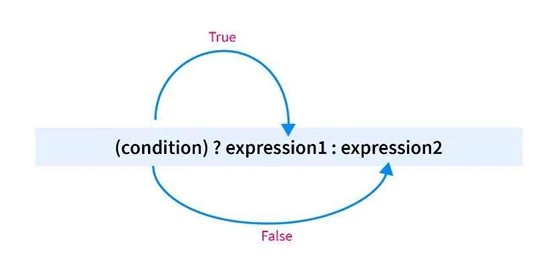
The Operator named “?:” is known as conditional Operator. It takes three operands. Thus, it is also called ternary operator. The syntax is :
value= expression ? expression2: expression3
working principal
If(expression 1)
variable = expression2;
else
variable = expression3;
Write a program to read two numbers from user and determine the larger number using conditional operator.
#include <stdio.h>
int main()
{
int n1, n2, larger;
printf(“Enter two numbers: “);
scanf(“%d %d”, &n1, &n2);
larger = (n1 > n2) ? n1 : n2;
printf(“The larger number is %d”, larger);
return 0;
}
Output:
Enter two numbers: 8 12
The larger number is 12
Bitwise Operator
The bitwise operators are the operators used to perform the operations on the data at the bit-level. When we perform the bitwise
operations, then it is also known as bit-level programming. It consists of two digits, either 0 or 1. It is mainly used in numerical
computations to make the calculations faster. It can be used only integer type values not float, double etc.
The bitwise operators are the operators used to perform operations on the data at the bit-level. When we perform bitwise operations, it is also known as bit-level programming. It consists of two digits, either 0 or 1.
It is mainly used in numerical computations to make the calculations faster. Bitwise operators can be used only with integer type values, not float, double, etc.
We have different types of bitwise operators in the C programming language. The following is the list of the bitwise operators:
| Operator | Name of the Operator |
|---|
& | Bitwise AND operator |
| ` | ` |
^ | Bitwise exclusive OR operator |
~ | One’s complement operator (unary operator) |
<< | Left shift operator |
>> | Right shift operator |
Truth Table of Bitwise Operators
Let’s look at the truth table of the bitwise operators:
| X | Y | X & Y | X | Y | X ^ Y |
|---|
| 0 | 0 | 0 | 0 | 0 |
| 0 | 1 | 0 | 1 | 1 |
| 1 | 0 | 0 | 1 | 1 |
| 1 | 1 | 1 | 1 | 0 |
Bitwise AND (&) gives 1 if both corresponding values are 1.
Bitwise OR (|) gives 1 if at least one corresponding value is 1.
Bitwise XOR (^) gives 0 if both corresponding values are the same, and 1 if they are different.
#include <stdio.h>
int main()
{
int a = 7, b = 14;
printf(“Bitwise AND: %d\n”, a & b); // 7 & 14 = 6
printf(“Bitwise OR: %d\n”, a | b); // 7 | 14 = 15
printf(“Bitwise XOR: %d\n”, a ^ b); // 7 ^ 14 = 9
return 0;
}
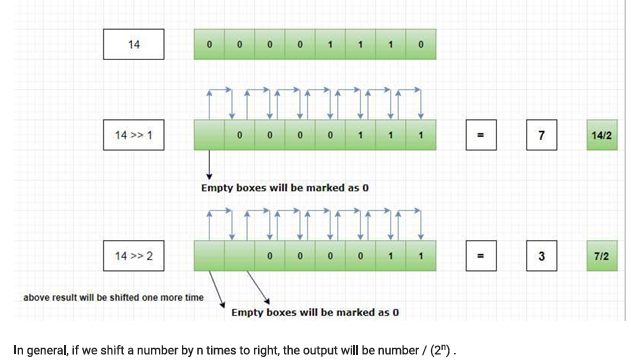
Left Shift Operator
The left shift operator is a type of Bitwise shift operator, which performs operations on the binary bits. It is a binary operator that requires two
operands to shift or move the position of the bits to the left side and add zeroes to the empty space created at the right side after shifting the bits.
Bitwise Left shift operator is used to shift the binary sequence to the left side by specified position.
Example
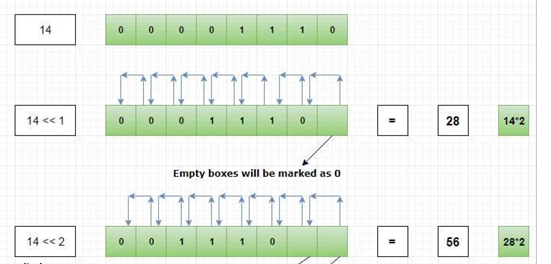
Let’s take a number 14.
Binary representation of 14 is 00001110 (for the sake of clarity let’s write it using 8 bit)
14 = (00001110)base2
Then 14 << 1 will shift the binary sequence 1 position to the left side. Like,